







Dash is here to explain...
 Dash:
Dash:
 Manager:
Dash:
Manager:
Manager:
Dash:
Manager:


Build a Digest in Four Quick Moves
-
PICK THE SIGNAL, DITCH THE NOISE.
Start from battle-tested blocks: Deals closing this week, Pipeline brief, New updates. Mix and match like Lego, not workflows.
-
TELL IT WHAT “MATTERS TODAY” MEANS.
Aim it: Likely deals > €10k, your reps, pushed close date or no next task. Filters kill the spray-and-pray alerts.
-
SEE IT EXACTLY AS IT LANDS IN SLACK.
Live preview = no surprises. Tune copy, order blocks, and make sure the card reads fast.
-
SHIP IT ON YOUR RHYTHM.
Weekday 08:30 for leaders, Friday PM for pipeline clean-up. Make multiple digests for different teams or days.
Built in minutes. No HubSpot workflows, no dashboard spelunking — just the right deals, at the right time, right in Slack.
See it in action
Open a deal from your Digest, get the story, and send feedback — without opening HubSpot.
Timeline + context in one place — not ten clicks deep.
Drop a note that the rep sees in Slack and we log in HubSpot.
Create a clear follow-up (no “check in”) right from the modal.
MY DIGESTS, DAY TO DAY
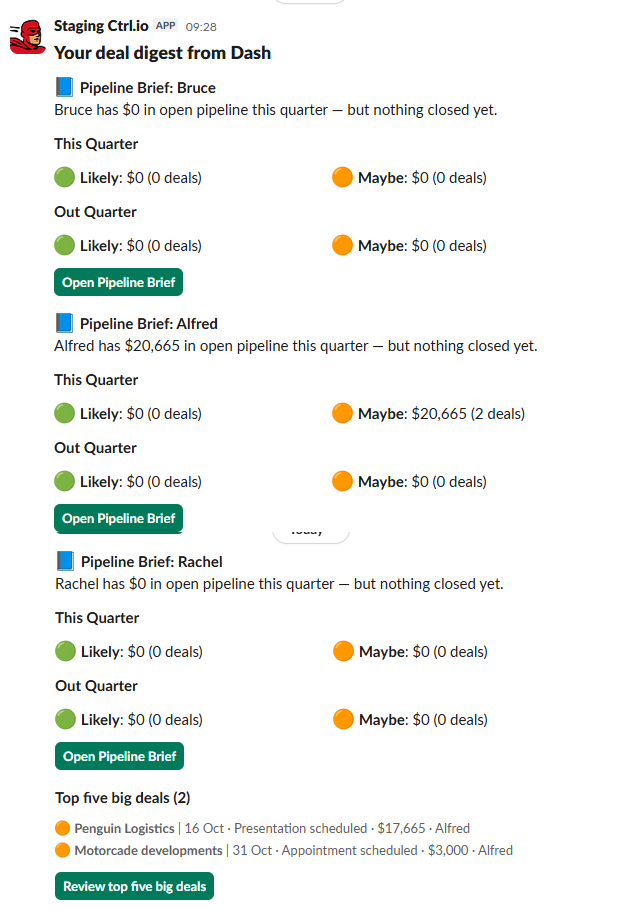
PIPELINE REVIEW, WITHOUT THE PREP.
Every Thursday I run pipeline reviews. Instead of spelunking HubSpot, I get one digest: Pipeline Brief ×3 (one per rep) plus a Top 5 Big Deals block. In two minutes I know who’s on track, who’s slipping, and where to dig in.
- PIPELINE BRIEF — BRUCE Triage dots, last movement, next task check.
- PIPELINE BRIEF — ALFRED Flags pushed dates + missing technical contact.
- PIPELINE BRIEF — RACHEL Highlights deals with fresh updates to review.
- TOP 5 BIG DEALS Quick forecast swing if any slip or value change.